
Features
EDIT YOUR YOGA POSES.
This is where you can create default information about a specific pose. Change the yoga position name. Enter detailed position instructions and movement notes. Enter comments or analogies you want to voice at a specific stage in the class. Assign a pose experience level. Re-categorize where the position is located in the pose pallet.
Important: Once you have edited the pose information you never have to do it again.
DRAG AND DROP YOUR POSES
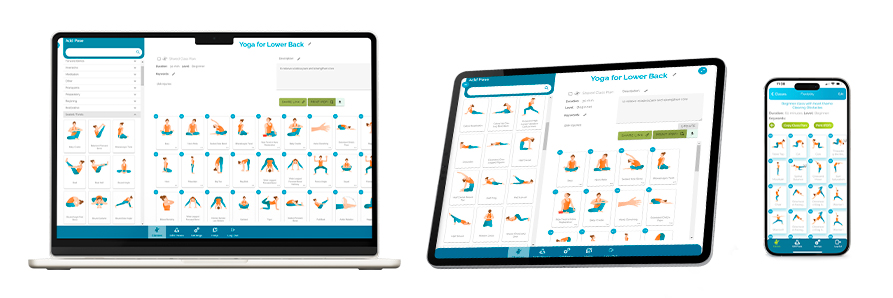
On your left, you have a pose pallet with all your yoga posture images. Simply select the one you wish to add and drag it to the canvas.
Once all the poses have been moved to the canvas you can rearrange, swap poses to create any sequence needed and add descriptions.
SAVE AND PRINT CLASSES.
Save your work and access it again 1 week, 6 months or 5 years from now. Regarding print options, we included some flexibility.
We know some teachers want just the sequence of positions printed where others like names, images and notes. It’s completely up to you.
SEARCH OVER 5000+ SHARED CLASS PLANS
Search a database of previously written lesson plans and select one appropriate for today’s or this evening’s class.
CROSS-PLATFORM COMPATIBILITY
YogaClassPlan is available on all devices with internet access. We ensure your classes are only a few clicks away from you.
Browsers · iOS and Android
Effortlessly Plan and Build Yoga Classes and Sequences in Minutes
Yoga Class Plan offers a wide range of pose illustrations and shared class plans to enhance your teaching skills and create engaging yoga classes. Easy to use, drag-and-drop interface. Start your free trial today and experience the benefits of our yoga platform firsthand.